SMS Opt-In Process
Last updated: July 2026
Text message notifications are an optional account-notification service for Veyainstructors and studio owners. They are used only to send transactional updates about your own studio booking activity, such as new booking requests, approvals, declines, cancellations, and expired approval holds. Consent is not a condition of using the platform, and no messages are promotional.
How to Opt In
Opt-in happens inside the authenticated Veya dashboard. There is no keyword-based or anonymous opt-in. The steps are:
- Sign into the Veya dashboard.
- Open Settings and enter a US mobile number.
- Select the separate SMS consent checkbox, which is unchecked by default.
- Select “Enable text alerts.”
Consent Disclosure
The exact language shown next to the consent checkbox is:
I agree to receive recurring transactional text messages from Veya about booking requests, approvals, declines, cancellations, expired approval holds, and schedule changes. Message frequency varies with booking activity. Message and data rates may apply. Consent is not a condition of using the platform. Reply STOP to opt out or HELP for help.
What We Record
When you opt in, Veya records your mobile number, your consent status, and the timestamp of your consent. See our Privacy Policy for how your mobile information is handled.
How to Opt Out
You can revoke consent at any time in one of two ways:
- Reply STOP to any message to stop all further texts.
- Turn off text alerts in the Settings section of your account.
Help
Reply HELP to any message for assistance, or email us at hello@veya.tools. Message frequency varies with your booking activity, and message and data rates may apply.
Opt-In Screenshot
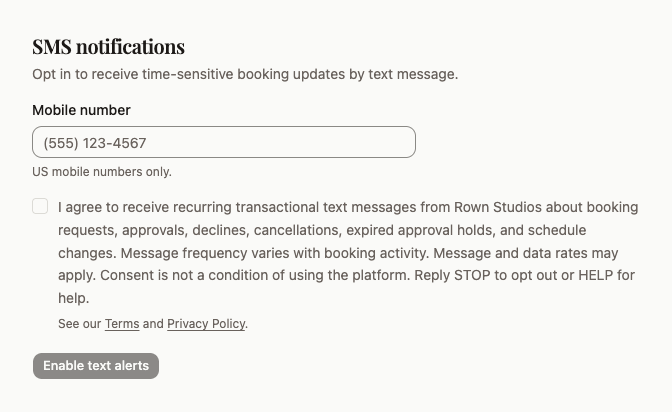
The screenshot below shows the SMS consent section of the authenticated Settings page, including the unchecked consent checkbox, the full disclosure, and the links to our Terms and Privacy Policy. It has been sanitized and contains no personal information.
Screenshot Transcript
For accessibility and machine-readable review, the screenshot above contains the following:
- Section heading “SMS notifications” with the subtext “Opt in to receive time-sensitive booking updates by text message.”
- A “Mobile number” field pre-filled with a neutral placeholder number and the helper text “US mobile numbers only.”
- An unchecked consent checkbox displaying the disclosure quoted above.
- Adjacent links reading “Terms” and “Privacy Policy.”
- An “Enable text alerts” button that remains disabled until a mobile number is entered and the consent checkbox is selected.
Learn More
Read our Privacy Policy and Terms of Service for the full SMS program details.